There is a question that hovers over every AI workshop, unspoken but persistent: Why are we here? Can't people just figure it out themselves? Anand's daughter asked him exactly this, with eight-year-old frankness (Anand: note: she's twenty, but the eight-year-old frankness is true), the morning of the workshop. What she didn't add — though it was implied — was the second half: "And why from you, of all people?"
It was 23 May 2026, a Saturday afternoon in Singapore. Seventy-six professionals — banking veterans, investment managers, consultants, fintech founders — had given up their weekend to attend the first of four AI workshops organized by the IIM Alumni Association Singapore. The occasion was the debut of a new series called AI Unboxed, and the topic was Context Engineering.
The host, Anand, is Head of Innovation at Straive and former co-founder of Gramener, one of India's pioneering data storytelling firms. His yearbook at IIM Bangalore called him "God of all things." At IIT Madras, everyone knew him as "Bhalla" — for reasons nobody has yet explained satisfactorily. His colleagues call him an "LLM Psychologist" — the person who studies not just what AI can do, but how it thinks, where it lies, and how to build a working relationship with it.
"The value that these workshops add is probably not as much that I am going to give you some content that will be useful. A big part of the value is you have decided to dedicate a certain amount of your time to do something related to AI."
— Anand, opening the session
He'd tested this thesis the day before, visiting teams at NUS and sitting in on a session by SUTD design professor Bradley Chambers. Something about being in the room — even a virtual Teams room — made the difference. The slides were the same. The magic was not. The environment itself, he concluded, is a form of context. Before the session even began, co-organizer Saurabh had quipped: "my latest prompt in Claude is 'write like Nayana Jain' and it comes up with these posts." Even the introduction was a demo.
The Background That Started Everything
The workshop opened not with a lecture but with a challenge. Anand had spent a few minutes before the session doing something unremarkable: he'd uploaded the IIMpact logo to ChatGPT and asked it to create a custom Teams background — "in my style," he added, because the model already knew his aesthetic from months of conversation. Ten minutes later, he was hosting a two-hour workshop with an AI-designed backdrop.
Now he asked 76 participants to do the same.
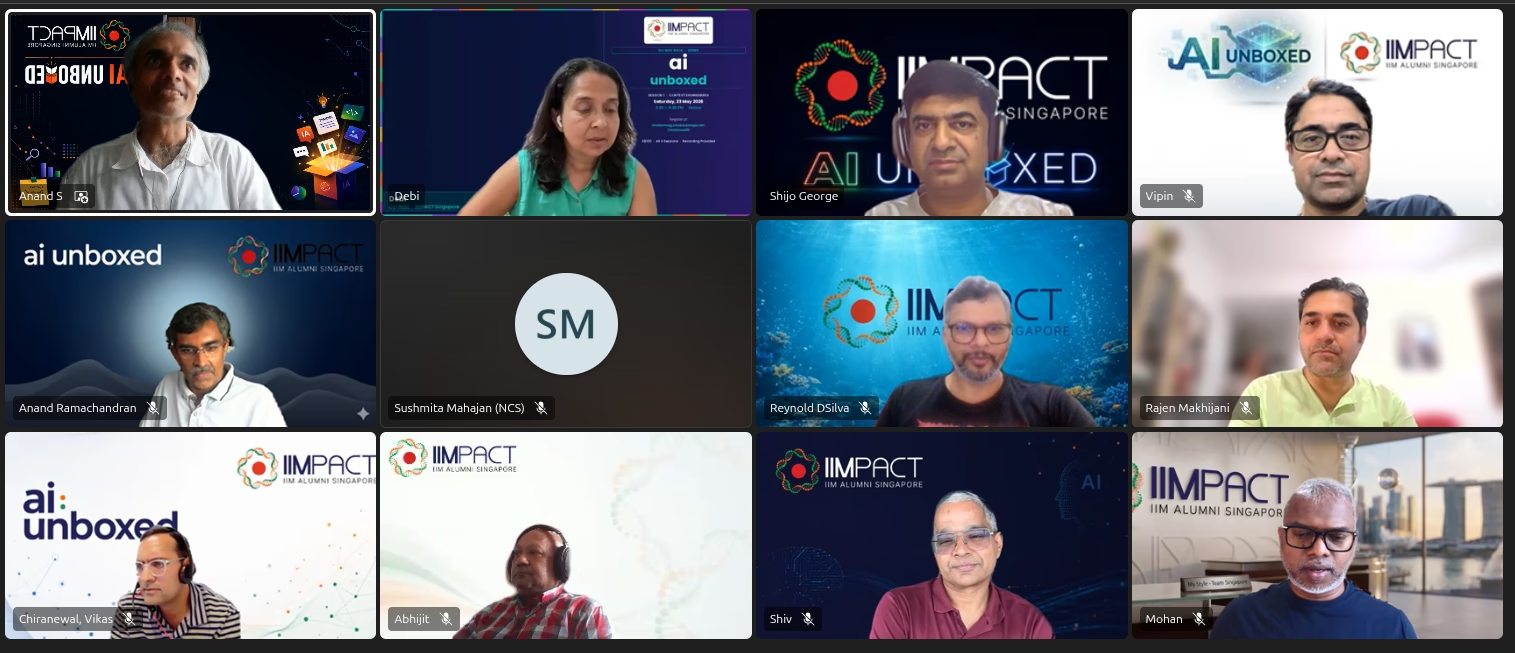
Within minutes, the spreadsheet — a live Google Sheet shared with all participants — began filling up. Nine entries, then twenty, then forty-four people had backgrounds. The Teams grid became a gallery of creativity: circuit-board blue gradients, clean corporate minimalism, one that looked suspiciously like a Bloomberg terminal. Anand's instructions were deliberately sparse: "Create a Teams background with this logo." The AI filled in the rest.
This was not an accident. It was the first lesson, delivered without being announced: you don't need to explain everything to get something great. You need to give the AI just enough context.
The prompt: "Create a Microsoft Teams background. Keep the IIMpact logo on the top right. Think about what will work as a great Teams background." Gemini responded in seconds. ChatGPT was slower but more polished. Claude couldn't generate images at all — "stick to one of these," Anand told the room.
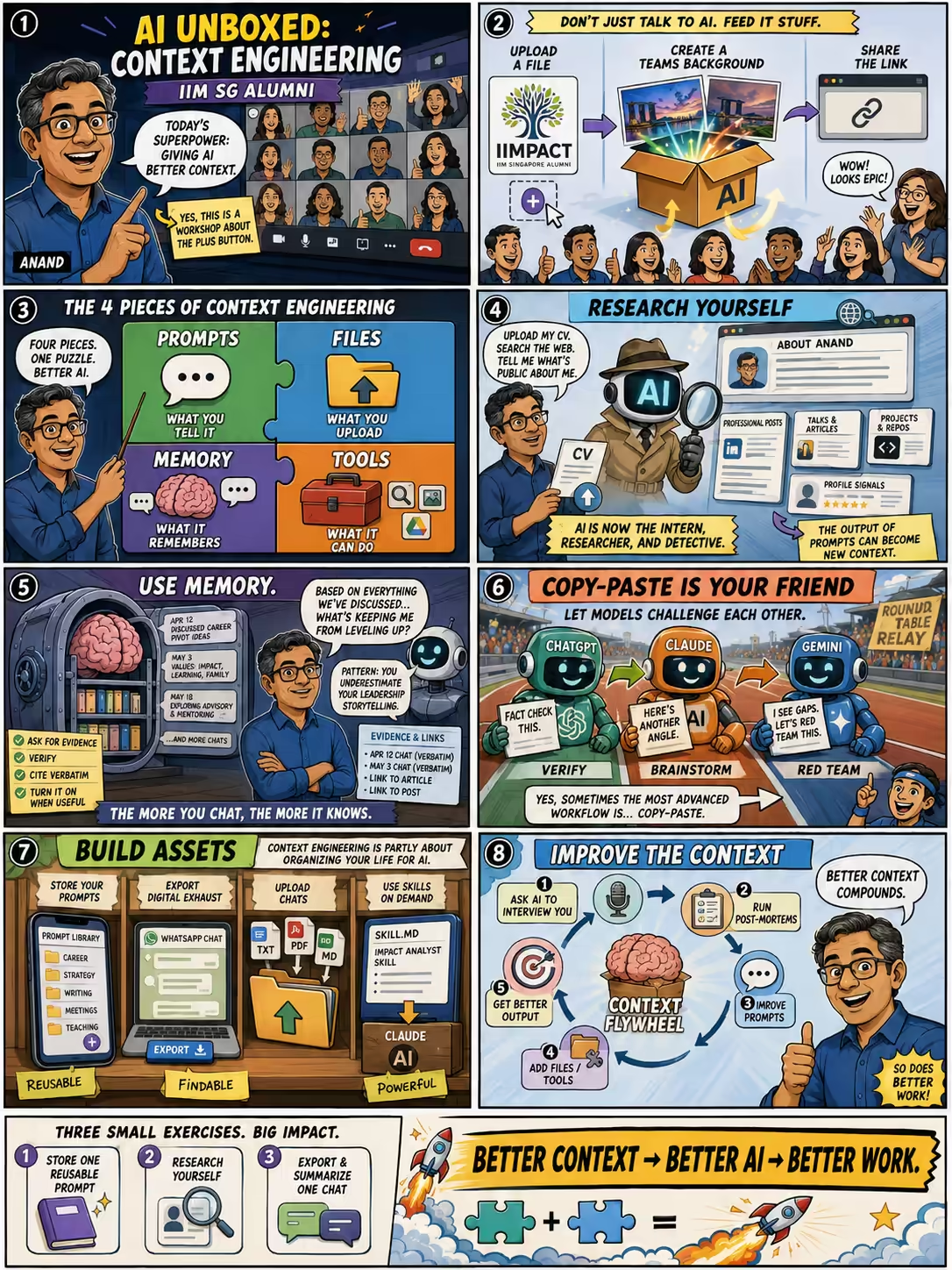
The exercise was not really about backgrounds. It was about uploading files. The "plus button" in ChatGPT, Gemini, and Claude — the one most people have never clicked — is, Anand would argue, the most underused feature in all of AI. Every major platform supports it: ChatGPT's paperclip, Gemini's plus, Claude's upload. Yet the vast majority of users never leave the text box.
"Today's session is about context engineering, and context engineering is largely about making sure that you've got stuff that you can upload — that you actually upload stuff."
— Anand
The Four Elements
Here is something unusual about Anand's thinking: he builds his frameworks on bike rides. The four-element model he was about to present had come to him during a cycle back from a police station (the story of why he was at the police station remains untold). He'd dictated his thoughts into ChatGPT. The model had helped refine them. By the time he arrived home, he had a framework.
He was careful to caveat it. This was not official theory. It was not peer-reviewed. It was one person's attempt to make sense of something that changes every three months — built on a prep session dictated into ChatGPT while cycling. And yet, for a room full of finance professionals trained to demand frameworks and resist hand-waving, it was exactly what was needed.
"What is true today, given the pace of AI development, will not be true tomorrow. So, don't worry too much about remembering it. What you do today is what will stick in your fingers, in your memory; that's what counts."
— Anand
The Detective in the Machine
The second exercise was more personal. Anand pulled up ChatGPT, switched on dictation — he rarely types when he can speak; dictation is faster and forces clearer thinking — and gave a prompt that every person in the workshop was about to use on themselves:
"I am Anand, head of innovation at Straive and former co-founder of Gramener and an IIM alumnus. Search online and find out everything that is known about me in the public."
Then he uploaded his CV. Then he watched the model work.
What ChatGPT did next was not a simple Google search. It searched for his company's acquisition history. It found his GitHub. It located his Reddit posts — ones he'd forgotten existed. It searched for him by role, not just name. It cross-referenced conference appearances, media mentions, and public databases. By the time it finished, it had assembled a dossier that felt uncomfortably thorough.
"This is roughly like giving a research assistant or a detective a task: 'Research me.' And they go sit and research, research, research, use their reasonably good brains, and come up with something consolidated. Increasingly, we should stop thinking of ChatGPT, Gemini, Claude, as tools and start thinking of them as agents. I literally think of them as professionals."
— Anand
He asked participants to do the same — research themselves, then share the link. The deeper lesson: everyone is already being researched this way. When a vendor prepares for a meeting, when a recruiter screens a candidate, when an old friend Googles you before reconnecting — this is the new due diligence. You may as well know what it finds. Then ask the follow-up: "What negative news is there about me?"
ChatGPT searched Singapore LinkedIn, Gramener's blog, Analytics India Magazine, GitHub, Reddit, and influencer lists — assembling a 2,000-word profile from publicly available fragments. The model found a 12-year-old Reddit account Anand had forgotten existed. "The more you're present online, the more it finds. The more somebody's talked about you online, the more it finds."
Memory: The Compounding Asset
Most people who use AI use it like a search engine: new question, new conversation, clean slate. Anand uses it like a relationship. Every conversation he has adds to a growing record of his thinking, his preferences, his projects, his personality. And unlike a human collaborator, the AI never forgets. Claude's memory and ChatGPT's memory are both enabled by default on paid tiers — yet most users have never checked whether theirs is on.
He demonstrated this with a question that required courage to ask in public:
"Based on all our past conversations, if you had to define the top three traits that are unusual about me that most people would consider negative traits, what would they be? Don't spare me."
The model responded quickly: you collect insights the way others collect trophies but rarely bleed for them. The room — or at least the part of it watching the screen — went quiet. He had just given a model access to years of his most candid conversations, and it had handed him a mirror.
"I've given up on my privacy anyway post-social media — actually pre-social media. So I just enable all the options including training, because my hope is that if it can be trained to my preference, then for free I've gotten a multi-trillion-dollar company to do a little bit of my bidding on my behalf, which is always fun."
— Anand, on enabling memory and training
But he didn't just accept the verdict. He asked the model to prove it — to cite verbatim from specific past conversations, to give him links he could open and verify. When it did, and he clicked through and found the exact text, his confidence rose. Hallucination is real, but so is verification. The key is asking the model to show its work — citations, links, verbatim quotes — so you can audit rather than trust blindly.
Claude, given access to memory, argued against Anand's own blog posts — finding fundamental flaws, not nitpicks. "I commissioned the critique from an AI, not from a peer," it noted. The model pointed to a "Skill.md conversation" and an "Accountability conversation" as evidence, and linked to the actual chats. "Yes, this conversation exists," Anand confirmed, clicking through. Verification by citation.
"Now I have a compounding asset. The more I chat with it, the more it knows about me."
— Anand
Tools: Delegation, Not Just Conversation
Here is the mental model Anand has spent years cultivating, and which he considers essential for anyone who wants to use AI seriously: don't think of it as a chatbot. Think of it as a professional you've hired.
ChatGPT is his researcher. Claude is his writer. Gemini is his language tutor. Each has a different personality, different strengths, different blind spots. He maintains a literal comparison spreadsheet — dates, prompts, models, ratings (red/amber/green) — to track which model performs best on which task. The conclusions he's reached after months of tracking:
- ChatGPT: Analytics, rigor, algorithms — especially on extended thinking (o1); he "lives on o1 thinking extended"
- Claude: Strategy, insight, soulful writing, creativity, front-end code
- Gemini: Learning, readable writing, foreign language, people search
These aren't fixed rankings. The LMSYS leaderboard shifts every few weeks as new models drop. Gemini was ahead three months ago. GPT-4.5 led on code last month. The point is not to pick a winner — it's to use each for what it's best at.
But professionals work better when they can see each other's work. So Anand built a small utility — a bookmarklet he can drag to his browser bar — that scrapes an entire conversation from any AI platform and copies it to his clipboard. One click, and a 20,000-word ChatGPT conversation becomes pasteable into Claude, for a different perspective, a different style, a fact-check. No API, no code to run — just a browser bookmark.
"Copy-paste is your friend. Do this on a regular basis because fact-checking keeps them honest and increases your confidence. They also are able to brainstorm with each other. They have very different styles of thinking."
— Anand
He demonstrated this live: scraping his prep chat from ChatGPT, pasting the entire thing into Claude Opus, then dictating an instruction: "This chat transcript has how I was preparing for the AI Unboxed session. Create a blog post in my style — here are some sample blog posts you can refer to." The output came back close enough that corrections were nitpicks: "ChatGPT is wonderfully obliging" instead of "ChatGPT wonderfully obliged." Close enough, he said, that the gap is closing faster than most people realize.
"If you give it a little bit of your context, it is able to copy you well enough that corrections are nitpicks."
— Anand, on AI mimicking personal writing style
WhatsApp as Context
One of the most practical moments in the workshop came when Anand turned to a tool most people carry in their pocket and almost never think of as a data asset: WhatsApp.
On every Android phone, buried under three dots → More, is an "Export Chat" button. Anand exports his chats regularly — classmate groups, family chats, client conversations. He feeds them to Claude or ChatGPT with a simple prompt: "Tell me what's been happening. Catch me up. Is there anyone I should reach out to — a birthday, a celebration, a congratulation?" The AI becomes a social memory prosthetic: it reads the 500 messages you've been too busy to, and surfaces the three that matter.
"Effectively, I'm creating a secretary to do my WhatsApp management."
— Anand
He's taken it further. His Python script — which he admits he doesn't fully understand the code of ("I have no idea what code it wrote") — opens his browser automatically, cycles through 35 WhatsApp conversations, and saves them to a file each morning. It identified 106 new messages in the generative AI group alone. It found that someone had messaged him 11 times and he hadn't noticed.
The script exists because he identified a need ("I can't even do this, what rubbish!") and asked Claude to build it. The prompt is published on his website. The code is visible. Anyone can replicate it. His AI conversation scrapers are public — bookmarklets that copy entire ChatGPT, Claude, or Gemini conversations to your clipboard in one click.
How to Research Yourself — and Others
Thirteen participants had already researched themselves by the midpoint of the session. The results were revealing — old blog posts, conference bios, LinkedIn endorsements, Reddit comments from 2012. One participant found a photo they didn't know was online. Another discovered a business profile that listed an outdated phone number.
Anand's next suggestion: "What negative news is there about me?" Then: "What would someone need to fix?" The output of one prompt, he reminded them, is itself context for the next prompt. The feedback cycle compounds.
"The output of prompts are also context, and that feedback cycle is a pretty important one."
— Anand
The Prompt Library: Smallest Habit, Biggest Return
With fifteen minutes left before the open Q&A, Anand paused for what he called the single most important exercise of the day — and by the reaction of the room, the most unexpected.
He asked everyone to answer one question: Where are your prompts stored?
His own answer: a folder at /home/anand/code/blog/prompts, also published on his blog (raw on GitHub). Some prompts are one line. Some run to hundreds of lines. His largest is "Analyze call recording" — a prompt that extracts personas, missed insights, next steps, and implicit tensions from any conversation transcript. He has been using it so consistently that he now has a corpus of 200+ analyzed conversations. He asks the model to look across them: What am I constantly missing? What kinds of experiments do you keep suggesting that I never try?
"I've gone back and said, 'Now across the last 200 conversations of mine that I have transcripts for, what are the kinds of things that I'm missing and what does that tell you about me?'"
— Anand
Participants responded. The Notes app. OneDrive. Google Drive. A WhatsApp group with themselves. One person wrote "Memory of the LLM itself" — a suggestion Anand hadn't considered. "Oh, that is clever," he said. "I will try this." Another wrote "Spreadsheet." Mike had a thoughtful answer. Ravi had a folder. The column slowly filled.
Anand's advice was stripped down to its essence:
"If there is only one thing that you learn out of this context engineering session, it is: store your prompts and reuse them. Frequently, infrequently — anything is okay."
— Anand
One fragment he showed: "Comprehensively and engagingly summarize and fact-check, writing in Malcolm Gladwell's style, explain like I'm 15, the book [title]." This prompt, he said, enabled him to hit a 50-book reading goal the previous year. He's now aiming for 360 books in 2026. "I don't know whether you consider reading summaries as counting towards a book," he admitted, "but I find that I'm getting about as many ideas and actions and takeaways from a summary written well as I am from reading the original book. High ROI."
Skills: Permanent Expert Knowledge on Demand
The session's most technically interesting moment came when Anand demonstrated a feature most Claude users have never opened: Skills.
In Claude's Settings → Customize, there is a Skills section. A skill.md is a prompt that loads automatically when Claude detects it's relevant. Instead of re-explaining your methodology every conversation, you write it once, store it as a skill, and Claude applies it whenever appropriate. Think of it as putting your best expert knowledge on retainer — available instantly, without prompting.
"Think of skills as permanent prompts, usable on demand, typically good for hardcore expert advice. There aren't many places where I know more than Claude. Other people may know more than Claude."
— Anand
He showed his data analysis skill: a several-hundred-line prompt capturing everything he knows about data storytelling — how to understand data structure, identify the audience, look for unexpected distributions, find breaking patterns. Fifteen years of expertise, distilled and delegated. He also has a design skill, copied directly from Anthropic's own blog. His full list of skills is public on GitHub — free to copy, adapt, and use.
When co-host Debi asked whether skills become part of context, Anand confirmed: Claude gets a directory of all skill names and descriptions, then decides which ones to load for a given question. "If I said 'Research me,' it wouldn't bother reading the data analysis skill." The description is the trigger. The skill is the payload.
How Smart Is Your AI, Really?
At some point in the session, Anand pulled up a leaderboard that no one outside the AI research community checks — but everyone should. The LM Arena leaderboard, run by LMSYS at UC Berkeley, ranks language models by having humans vote on which gives better responses in blind comparisons. It's the most honest measure we have.
He walked the room through the arc of AI intelligence over the past three years — not as a technology history, but as a gut-check. In 2023, models were roughly as smart as a high school student. By late 2023, with GPT-4, they crossed into college-junior territory. By September 2024, O1-preview reached near-Master's level. Then, with the latest generation, something shifted:
"With Gemini 2.5 Pro, they became as smart as a tenured professor. Now, we are talking to models that are smarter than tenured professors."
— Anand
He showed data from OpenAI's GPQA study, which pits AI against human experts task by task. Software developers: O3-mini beats humans 95% of the time. Personal financial advisors: already beaten, across Claude, ChatGPT, all of them. The LLM Pricing tracker shows how quality has risen while costs have fallen — a combination unprecedented in the history of professional services.
"Personal financial advisors are already beaten by Claude, ChatGPT, any of them. So I'm not going to hire a personal financial advisor anymore."
— Anand
For a room full of finance professionals, this was not an abstract statement. It was a direct challenge to their industry's assumptions about the value of human expertise. The models aren't just faster — they're more thorough, more patient, and cheaper than any junior analyst you could hire.
He shared a practical corollary: always pay for AI. Not because free models are worthless, but because the difference in quality is enormous — and because paying makes you use it more, which makes it more valuable. "It's the reason why I guess we hire a BCG or a McKinsey consultant, or arguably any luxury item... you're taking it seriously, just like a gym fee." One month of Claude or ChatGPT costs less than a single consulting hour.
The Q&A: Where the Real Workshop Happened
The first ninety minutes had been Anand's show. The second half belonged to the audience — and IIM alumni, trained in case method pedagogy and accustomed to interrogating arguments, did not disappoint.
On Hallucinations
Vijay asked about hallucinations — and Anand's answer was unexpectedly sociological. Humans hallucinate all the time, he noted. We call it lying. We have institutional systems to manage it: juries, regulators, auditors. The regulator knows less about banking than the bank; the juror knows less about patents than the lawyers. We've built verification systems for human unreliability. Apply the same principles to AI:
- Ask for falsifiable output — "Give me the answer along with evidence I can verify"
- Convert output into checklists — testable, structured, auditable
- Testable output — code runs or doesn't; contracts can be formalized into machine-testable rules using tools like InsurLE (research paper)
- Sample and spot-check — you don't need to verify everything
- Red-teaming — pass the answer from Model A to Model B and ask it to find errors
- Maintain a log — red/amber/green, like a simple Notepad file with dates and ratings
- Build memory — individually and as an institution
On Models Getting Stupider Mid-Conversation
Rajen — a participant for whom Anand's data story had, in his words, "changed the destiny of my business" — raised a phenomenon every power user has experienced: the model getting worse the longer the conversation runs. By message 30, it's agreeing with you instead of helping you. By message 50, it's giving you the same output no matter what you ask.
"I found that increasingly as the chat progressed, the model in my view got stupider and stupider."
— Rajen, audience participant
Anand's answer: known behavior — a well-documented phenomenon sometimes called lost in the middle. The solution is to start a new chat. The question is just what context to carry over. Options: rely on memory, copy-paste the key parts, or ask the model to "Summarize this conversation so that I can copy-paste it." The most efficient version: "I'm going to give this to Claude. Just write down what I need to copy-paste."
On MCP and the Future of Tools
Debi asked about MCP — Model Context Protocol — which Anand had demonstrated briefly by connecting his local machine to Claude via a Cloudflare tunnel. Claude had searched his local file system for blog posts to understand his writing style. The model ran code on his machine, not its own servers.
"MCP is Anthropic's programmer's way for them to expose programs so that AI agents can use them," he explained. "How do you use it? We'll get to it in another session." (Session 3: Agentic Analysis. Session 4: AI Strategy and toolbuilding.) But for anyone impatient: modelcontextprotocol.io — and there's already a growing ecosystem of MCP servers for databases, Google Drive, GitHub, Slack, and more.
On AI Harnesses
Sandeep asked about the layer above models — applications like Claude.ai, ChatGPT, Manus. Anand had a word for these: harnesses.
"Harnesses are becoming the de-facto way of using models. Nobody accesses models directly for the majority of their real-life tasks. They do it through harnesses. ChatGPT is a harness. Claude.ai is a harness to models behind the scenes."
— Anand
He noted that Claude Code is a better coding harness than GitHub Copilot, even though both use Anthropic models under the hood. The engineering of the harness makes more difference than the choice of model. Other notable harnesses: Cursor for code editing, Perplexity for research with citations, NotebookLM for document Q&A. And the most interesting — OpenAI's desktop app — is different because it's "always on", watching your screen and ready to help without being invoked.
On Continuous Improvement
He closed his formal content with two meta-level pieces of advice — the kind that only become obvious after years of practice.
The first: when you don't know how to use AI, ask AI. Run an "AI interview." Say "I'm feeling lost. Interview me and help me." Give it a role if you can — psychologist, coach, HR professional. Let it be the doctor. You be the patient. This is not laziness; it's leverage. The interview format forces clarification that a single prompt never achieves — each question narrows the problem until you can actually act on it.
The second: run post-mortems. Go through past chats. Ask: "Where did you do well? Where didn't you do well? Where did I correct you? What would have gotten a better result — a different prompt, more files, better memory?" The model will tell you. Then fix it. Treat AI like any other professional relationship: feedback flows both ways.
"Ask it to interview you when you don't know what you want; ask it to run post-mortems so that it can help you improve even further."
— Anand
The Screenshot That Ended It
Near the end, Anand paused to take a screenshot of the Teams grid. Forty-four participants had created AI-generated backgrounds. The screen was a gallery: ocean blues, minimalist circuits, bold typography, one background that had somehow turned the IIMpact logo into a kind of corporate aurora borealis. He asked four more people to turn on their cameras. Then he took the screenshot.
It will never go viral. But it captured something real: seventy-six finance professionals who came with questions and left with something more — a file of prompts, an exported WhatsApp chat, a freshly researched profile of themselves, and the slightly unsettling knowledge that the models they'd been treating as fancy search engines are now smarter, in certain ways, than the professors who trained them.
"Thank you," Debi said, closing the session. "I think between now and June, everybody who attended is going to try some of the exercises."
"Or don't," Anand added, "if you have better things to do."
Nobody logged off immediately. The Q&A ran over. People had better things to do, but they stayed anyway. That, too, is a form of context.
Resources from the Workshop